
WHY Radio – Spectrum, Waterfall, DSP and Radio Control
WHY Radio is an experimental Windows application for radio control, real-time spectrum/waterfall display and PC-side DSP.
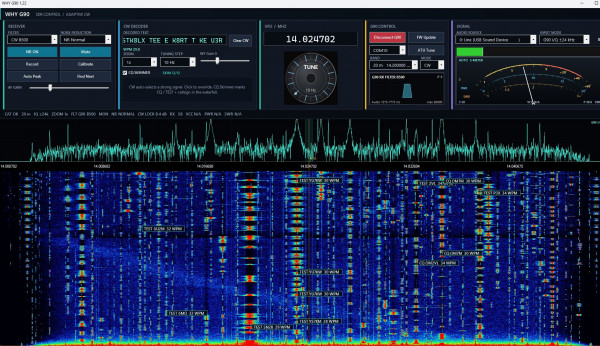
The program originally started as WHY G90, developed specifically for the Xiegu G90. During development, however, most of the software became independent of the radio itself. Spectrum display, waterfall, I/Q processing, audio DSP, graphical notch filters, noise reduction, recording, CW decoding and CW Skimmer can all be useful with many different receivers and transceivers.
For that reason the project has now evolved into WHY Radio.
The Xiegu G90 remains the first fully integrated radio and currently has the most complete CAT support, but WHY Radio can also operate in Audio / I-Q only mode with other radios. The intention is to add additional radio drivers without having to create a separate spectrum/DSP program for every transceiver.
The basic idea
WHY Radio consists of two main parts:
A common radio-independent DSP/display engine
This handles:
- Real-time spectrum and waterfall
- Stereo I/Q input
- Mono receiver audio
- Local RX filtering
- Noise reduction
- Noise blanker
- Manual and graphical notch filtering
- Local AGC and squelch
- Audio monitoring
- WAV recording
- CW decoding
- Multi-channel CW Skimmer
- Markers, peak detection and direct spectrum tuning
Radio-specific drivers
The radio driver handles functions such as:
- CAT frequency control
- Mode selection
- Radio status
- Meter readings
- Band control
- ATU functions
- Radio-specific commands
This means the DSP and waterfall system does not need to be rewritten when support for another radio is added.
Xiegu G90 support
The G90 is currently the primary supported radio.
When the Xiegu G90 driver is selected, WHY Radio provides CAT synchronization together with the G90 rear-panel I/Q output.
For best spectrum performance, connect the G90 I/Q output to a true stereo Line-In or suitable USB sound interface.
WHY Radio can then display RF spectrum around the current VFO frequency while CAT keeps the spectrum and radio frequency synchronized.
The program also supports normal mono receiver audio when I/Q is not available.
Audio / I-Q only mode
WHY Radio can also be used without a supported CAT radio.
Select Audio / I-Q only and connect audio or stereo I/Q from another receiver, SDR, transverter or transceiver.
In this mode the radio-specific controls are disabled, but the main signal-processing functions remain available.
This makes WHY Radio useful as a general PC spectrum, waterfall and DSP receiver tool even before a dedicated CAT driver exists for a particular radio.
Spectrum and waterfall
The spectrum and waterfall are designed to be interactive rather than just displays.
Signals can be selected directly with the mouse, and the display includes:
- Click tuning
- Zoom
- Peak detection
- A/B measurement markers
- Max hold
- Adjustable FFT and waterfall settings
- Selectable sample rate
- I/Q correction
- Frequency and signal information
- Direct graphical filter indication
With a suitable stereo I/Q source, WHY Radio displays both sides of the tuned frequency instead of only an ordinary audio spectrum.
Graphical notch filtering
One of the more useful DSP functions is the Graphical Notch.
A notch can be placed directly on an unwanted carrier visible in the spectrum. The notch is not just a graphical marker — it is a real DSP filter in the PC receive/monitor audio path.
The notch position and width can be adjusted directly on the spectrum.
Several graphical notches can be active simultaneously.
Noise reduction
WHY Radio includes adjustable PC-side noise reduction for speech and CW reception.
The normal NR control provides quick settings, but more detailed adjustment is available by right-clicking the NR control.
The Advanced NR settings allow adjustment of:
- Reduction strength
- Minimum audio retained
- Noise adaptation speed
A gentler setting can therefore be used for weak signals where aggressive noise reduction would otherwise remove part of the wanted signal.
CW decoder and CW Skimmer
WHY Radio contains an adaptive CW decoder with automatic speed estimation and WPM display.
The optional CW Skimmer can monitor several CW signals simultaneously across the visible I/Q spectrum.
Detected calls and CQ/contest activity can be marked directly in the waterfall, making it possible to see several active CW stations at the same time.
The main CW decoder remains locked to the selected VFO signal while additional Skimmer channels monitor other parts of the spectrum.
Local DSP versus radio DSP
An important distinction is that many WHY Radio functions operate on the PC audio/I-Q path.
Functions such as:
- Graphical notch
- Local RX passband
- NR
- NB
- Local AGC
- Squelch
do not replace the radio's own IF/DSP system.
This is intentional. The radio can retain its normal receiver settings while WHY Radio provides an additional processing and monitoring layer on the PC.
Sample rate
WHY Radio supports several audio/I-Q sample rates, depending on the capabilities of the selected sound interface.
48 kHz is a good general-purpose setting and 96 kHz provides a wider visible I/Q spectrum when supported by the hardware.
Higher rates can also be selected when supported by the audio device. WHY Radio checks the requested format before replacing a working audio stream so that an unsupported setting should not lock the application.
Band stack and operating memories
For supported radios, WHY Radio can maintain multiple operating positions for each amateur band using the B1, B2 and B3 band-stack registers.
Frequency memories can store more than just a frequency and can restore useful operating state such as mode, tuning step and DSP settings.
Development direction
WHY Radio is still under active development.
The goal is not to make a separate application for every radio.
Instead, WHY Radio is intended to provide one common spectrum, waterfall and DSP environment with interchangeable radio drivers.
Currently:
Xiegu G90 – integrated CAT/radio support
Audio / I-Q only – general receiver/I-Q operation without CAT
Additional radio support can be added later while keeping the same waterfall, DSP, CW and operating interface.
This approach also replaces the need for a separate WHY Waterfall application — the general waterfall and DSP functions now belong naturally inside WHY Radio.
Download
WHY Radio for Windows
why-radio-1-60.zip
The program is experimental software and is continuously being developed. Feedback, bug reports and suggestions are welcome.
If you like the program and feel to donate use the Donate button.
Welcome
Welcome to sm6why.n.nu.

My Newsletter
Links