
Hp 859x Gpib Controller
HP 859x GPIB Controller
HP-style spectrum-analyzer control software for Windows
HP-8590 Control v2.0.2 is a Windows application for remote control, live trace acquisition, measurement analysis, and documentation with HP/Agilent 8590-series spectrum analyzers, including the 8593E.
The interface uses eight context-sensitive HP softkeys. All normal operating functions are available from the softkey panel or by using the F1–F8 keys.
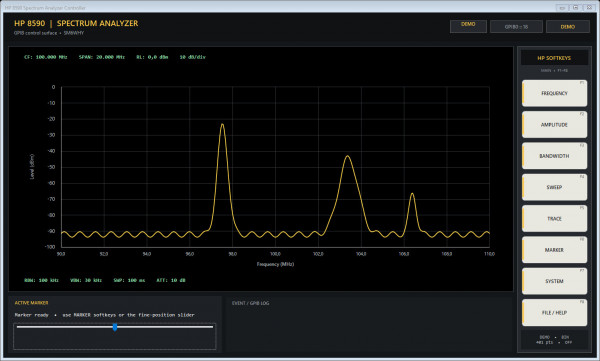
HP-8590 Control v2.0.2 running in hardware-free Demo Mode.
Main features
- Live 401-point spectrum display.
- Center frequency, span, start/stop frequency, and full-span control.
- Reference level, dB/division, attenuation, and detector selection.
- RBW, VBW, sweep time, and automatic coupling.
- Continuous, single, and stopped sweep operation.
- FREE, LINE, EXT, and VID trigger modes.
- Exponential averaging with adjustable averaging count.
- Maximum Hold and Minimum Hold.
- Marker maximum/minimum and next/previous peak search.
- Marker-to-center and peak-to-center functions.
- Automatic −3 dB bandwidth and Q calculation.
- Binary trace transfer with guarded ASCII fallback.
- PNG, CSV, clipboard, print, and event-log export.
- Instrument identification, correction-status reading, and safe calibration backup.
- Hardware-free Demo Mode for learning and testing the complete interface.
Simple GPIB setup
SYSTEM → GPIB SETUP opens one dialog containing all communication settings:
- Board number: NI controller index, normally 0.
- Primary address: the analyzer’s GPIB address, often 18.
- Secondary address: optional; use −1 when none is assigned.
A live preview shows the resulting address, for example:
GPIB0 :: 18
Board number, primary address, and secondary address are configured together.
Requirements
- Windows 10 or Windows 11.
- .NET Framework 4.7.2 or a compatible later 4.x runtime.
- National Instruments NI-488.2 runtime.
- A compatible NI GPIB adapter.
- An HP/Agilent 8590-series spectrum analyzer with an IEEE-488/GPIB interface.
The adapter and analyzer should first be verified in NI MAX. Every device on the GPIB bus must use a unique primary address.
Quick start
- Install NI-488.2 and connect the analyzer.
- Start HP-8590.exe
- Open SYSTEM → GPIB SETUP.
- Enter the board number and analyzer address.
- Select SYSTEM → CONNECT.
- Run SYSTEM → IDENTITY as the first communication test.
- Use FREQUENCY, AMPLITUDE, BANDWIDTH, SWEEP, TRACE, and MARKER to configure the measurement.
- Save the result using FILE / HELP → EXPORT HD PNG or EXPORT CSV.
Select SYSTEM → DEMO MODE to explore the complete application without a connected analyzer.
Calibration safety
SAFE CAL BACKUP records readable identification, correction status, and instrument settings. It is not a complete NVRAM image.
Never restore or modify analyzer calibration data without the correct HP service procedure, a verified backup, and knowledge of the exact analyzer model and firmware.
Documentation and measurement export
HP-8590 Control makes it easy to save repeatable spectrum measurements without relying on the analyzer’s memory card system or photographs of the display.
Exports can include:
- High-resolution 1920 × 1080 PNG images.
- CSV files with frequency or zero-span time values.
- Marker information.
- Event and optional raw GPIB communication logs.
Link to program:
If you like the program and feel to donate use the Donate button.
Welcome
Welcome to sm6why.n.nu.

My Newsletter
Links